Live Market Data (Yahoo/yfinance)
This notebook is optional and not deterministic. It can make a live network request through the optional
yfinancedependency. If you don’t have network access or themarketextra installed (pip install abaquant[market]), the cell below will raise aMarketDataError, which is caught and reported cleanly.
What it shows:
Constructing a
MarketTickerbacked by the Yahoo Finance provider, with disk caching for financial statements.Retrieving (or reusing a cached) annual statement snapshot.
Reading major line items and running the credit-proxy assessment.
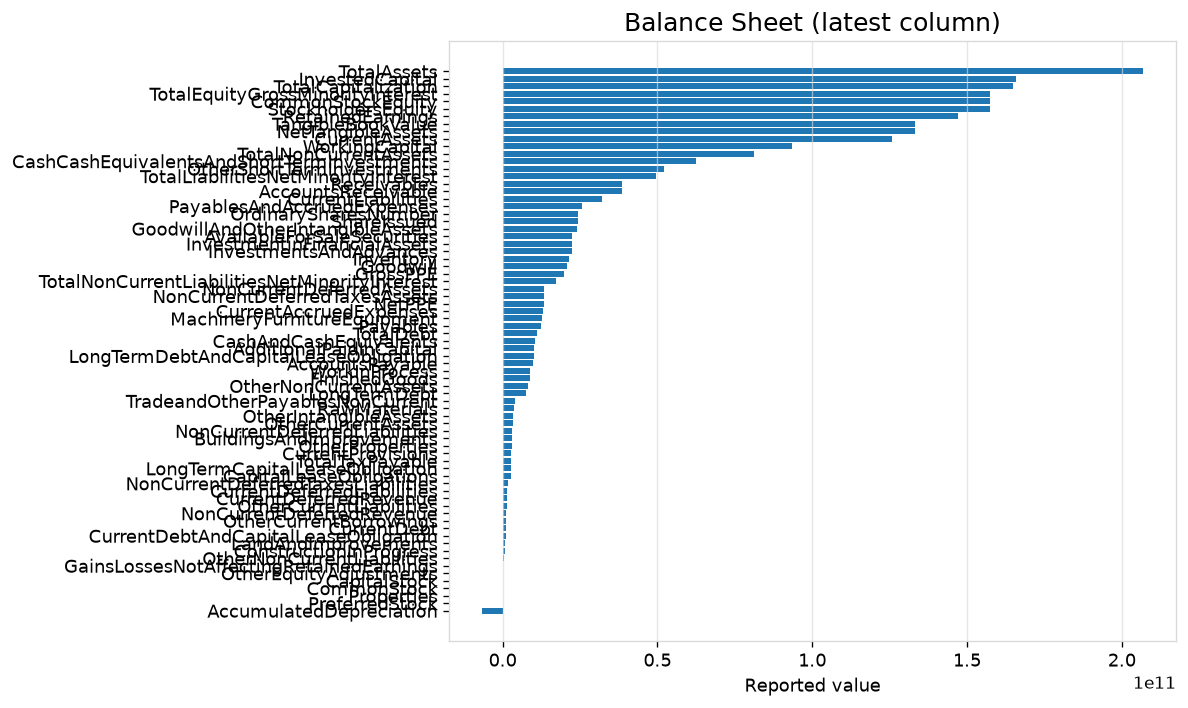
Optional visualization of the balance sheet and credit score.
Setup
import abaquant
print(f"AbaQuant version: {abaquant.__version__}")
AbaQuant version: 1.0.0rc1
from pathlib import Path

from abaquant.marketdata import get_ticker
from abaquant.marketdata.errors import MarketDataError
from abaquant.visualization import VisualizationError
Build a live Yahoo-backed ticker
Financial statements are cached to disk under .qa_example_cache/ so
repeated runs don’t re-request the same data.
SYMBOL = "NVDA"

ticker = get_ticker(
    SYMBOL,
    provider="yahoo",
    financial_cache="disk",
    cache_directory=Path(".qa_example_cache"),
)
Retrieve or reuse the annual statement snapshot
def run_live_example():
    ticker.financials.snapshot(period="annual", refresh_policy="if_stale", max_age_days=7)
    assessment = ticker.credit.assess_from_financials(period="annual")
    summary = {
        "symbol": ticker.symbol,
        "total_debt": ticker.financials.total_debt(period="annual"),
        "ebitda": ticker.financials.ebitda(period="annual"),
        "operating_cash_flow": ticker.financials.operating_cash_flow(period="annual"),
        "synthetic_score": assessment.synthetic_credit_proxy_score,
        "synthetic_band": assessment.synthetic_credit_proxy_band,
    }
    return assessment, summary


try:
    assessment, summary = run_live_example()
    for key, value in summary.items():
        print(f"{key:24s}: {value}")
except MarketDataError as exc:
    print("Live Yahoo example skipped (no network access or missing 'market' extra).")
    print(exc)
symbol                  : NVDA
total_debt              : None
ebitda                  : 144552000000.0
operating_cash_flow     : None
synthetic_score         : None
synthetic_band          : unavailable
Optional: visualize the balance sheet and credit score
try:
    figures = {
        "balance_sheet": ticker.financials.visualize(statement="balance_sheet"),
        "credit_score": assessment.visualize(chart="score"),
    }
    print(f"Created {len(figures)} figures: {list(figures)}")
except NameError:
    print("Skipped: the live retrieval cell above did not complete.")
except VisualizationError as exc:
    print(f"Visualization skipped (optional dependency missing): {exc}")
Visualization skipped (optional dependency missing): A synthetic credit proxy score is unavailable for this assessment.
Takeaway
Everything else in this notebook collection uses deterministic, offline fixtures on purpose — see notebook 06 — Market Data (Offline) for the same workflow with reproducible, network-free data.